WordPress vs Webflow vs custom code for small business
WordPress, Webflow or a custom-coded site for a US small business: who edits it, what it costs to own, and when each is the wrong choice.

If you are choosing a platform for a new business website, you will get confident answers from everyone, and they will disagree. Usually that is because each person is recommending the thing they sell. We build on both WordPress and hand-coded stacks, so here is the comparison we give clients, including the cases where we would tell you not to hire us at all.
If you are also weighing Wix or Squarespace, read website builder or WordPress first. This post picks up where that one stops: you have decided you want something more flexible than a basic builder, and you are choosing between WordPress, Webflow and a custom-coded site.
The short version
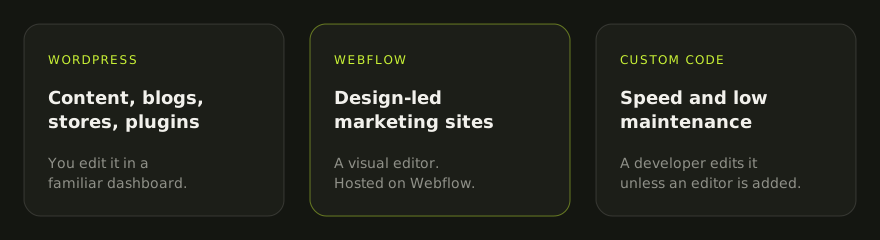
| WordPress | Webflow | Custom code (for example Astro or Next.js) | |
|---|---|---|---|
| Best for | Sites with lots of content, blogs, WooCommerce stores, owners who want plugins | Design-led marketing sites edited by a non-technical team | Sites where speed, security and low maintenance matter most |
| Who edits it | You, in a familiar dashboard | You, in a visual editor | A developer, unless a content editor is added |
| Hosting | Your choice of host | Webflow only | Your choice; often cheap static hosting |
| Ongoing upkeep | Core, theme and plugin updates | Platform handles it | Very little for a static site |
| Lock-in | Low: open source, move hosts any time | Higher: design stays on Webflow | Low if you own the code repository |
| Typical weak spot | Plugin sprawl and slow page builders | Subscription cost and platform limits | Editing without a developer |
WordPress
WordPress is open-source software you install on hosting you choose. That is its biggest advantage: nobody can take it away from you, and almost any developer can work on it.
Where it shines. Content-heavy sites, blogs, and online stores through WooCommerce. If you want to publish articles every week, add an events calendar, take bookings and sell a few products, there is a well-tested plugin for each. Your team can learn the editor in an afternoon.
Where it goes wrong. The flexibility is also the risk. A site with thirty plugins and a heavy page builder can become slow, fragile and a security worry. Updates need doing, usually monthly, and occasionally one breaks something. Cheap hosting makes all of this worse. Most “WordPress is slow” complaints are really “this WordPress build is slow”. We wrote about why WooCommerce sites slow down and what fixes them.
Choose it if you will publish often, need e-commerce or specific integrations, or want the option to switch developers and hosts freely.
Webflow
Webflow is a hosted visual design tool with a built-in content system. Designers like it because what you draw is what gets published, without a theme getting in the way.
Where it shines. Polished marketing sites where the look matters and a small non-technical team needs to update pages and blog posts without breaking the layout. Hosting, security patches and backups are handled by the platform, so there is no plugin maintenance.
Where it goes wrong. You can only host on Webflow, and you pay a recurring subscription per site, with limits that depend on the plan (for example how many CMS items you can have). Check the current plans on Webflow’s own pricing page before you commit, because they change. If you ever leave, your content can be exported but your design does not come with you, so moving means rebuilding the front end. Complex functionality, such as custom logins or deep integrations, often needs third-party tools stitched on.
Choose it if design is a priority, the site is mainly marketing pages and a blog, and you are comfortable with an ongoing platform fee in exchange for no maintenance.
Custom code
“Custom” here means a developer builds the site in code, often with a modern framework such as Astro or Next.js, and hosts it as mostly static files. Our own site is built this way, with Astro on Cloudflare Pages.
Where it shines. Speed and stability. A static site has no database to hack and no plugins to update, so it can sit untouched for months and still be fast and secure. You can also build exactly what you need, such as a calculator, a quote tool or a client portal, without fighting a theme.
Where it goes wrong. Editing. Changing text on a purely coded site means asking a developer or learning to edit files. That can be solved by connecting a headless CMS, but it adds cost and setup. And you are more dependent on developers who know that framework, which is why owning the code repository matters.
Choose it if speed and low maintenance matter more than daily editing, or you need custom functionality that would be awkward to bolt onto a template.
What actually drives the decision
Forget feature lists for a moment and answer these four questions:
- Who will update the site, and how often? Daily edits by a non-technical team point to WordPress or Webflow. Edits a few times a year make custom code viable.
- What does it need to do besides show pages? Store, bookings, memberships, integrations: WordPress usually has the most ready-made options. Unusual functionality may be easier in custom code.
- What will it cost to own for three years, not just to build? Add up hosting, subscriptions, plugin licences, updates and the developer time for changes. A cheap build with expensive upkeep is not cheap. The published 2026 ranges by route are in how much a small business website costs in the US in 2026.
- What happens if you part ways with your developer? You should own the domain, the hosting account (or platform account) and the code or content, in writing, from day one. Our post on what a US website quote actually contains has the ownership questions to ask.
Speed and SEO: does the platform matter?
Less than people claim. All three can produce clean titles, descriptions, URLs, redirects and structured data, which is what search engines need. All three can also be slow if built badly. A lean WordPress theme on decent hosting can be fast; a Webflow site full of large videos can be slow; a custom site can be fast by default but still ship huge images.
Measure rather than assume. Run your current site through PageSpeed Insights on mobile, a few times, and look at the Core Web Vitals. If the numbers are poor, our guide to fixing a slow website covers the fixes in the order that usually pays off.
Our honest recommendation
- A simple brochure site you will rarely change: a website builder or a small custom site. You may not need WordPress at all.
- A growing business that will publish content and may add a store: WordPress, built lean, on good hosting.
- A design-led marketing site run by a small team that hates maintenance: Webflow, if the subscription fits the budget.
- A site where speed, security and custom tools matter most: custom code, with a content editor if you need one.
Not sure which fits? Tell us what the site needs to do and who will update it, and we will recommend a platform, even if the answer is one we do not build on. Get a quote.
Questions
Neither platform ranks a site by itself. Both let you control titles, descriptions, URLs, redirects and structured data. What matters more is content, speed and how the site is built, and both can be fast or slow depending on the build.
Usually more expensive to change later, not always to build. A simple custom site can cost about the same as a WordPress build, but every edit beyond text may need a developer unless a content editor is added.
Your content can be exported, but the design and interactions do not move across. Plan for a rebuild of the front end if you ever switch, and make sure you own your domain separately from the platform.
Mostly WordPress for sites the owner wants to edit day to day, and hand-coded Astro sites where speed and low maintenance matter most. Our own site is built with Astro. We recommend whichever fits the business, including a website builder when that is genuinely enough.
Written by Ahsan “Max” Faraz, Maxverse Lab — Karachi
A fixed quote before we start. We reply within 24 hours.